Enabling the System Event Audit Log
Applies to Sub-Control 6.2
Note
Enabling system logs on a Windows 10 system can be a complex task. There are hundreds of different types of logs that can all be enabled differently. This Guide shows one of many possible methods for enabling system event audit logs. For organizations looking for a solution balancing ease of use and security, CIS recommends organizations enable the following log types from Microsoft (https://docs.microsoft.com/en-us/windows-server/identity/ad-ds/plan/security-best-practices/audit-policy-recommendations).
In the Windows search bar with the magnifying glass icon, type local group to open the Local Group Policy Editor. This is shown below:
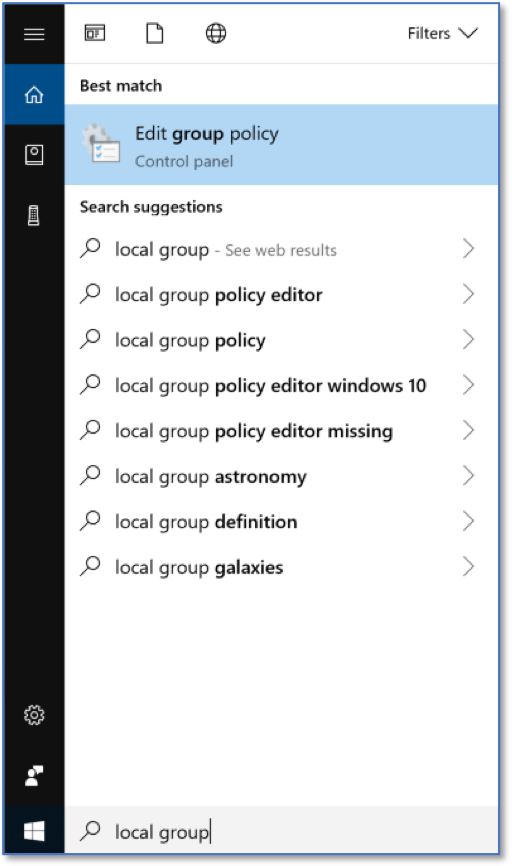
Searching for Local Group Policy Editor
The Local Group Policy Editor is show below.

Local Group Policy Editor Home Screen
Under Computer Configurations, select Security Settings, and then Advanced Audit Policy Configuration.

Advanced Audit Policy Configuration
Expand Advanced Audit Policy Configuration to show System Audit Policies - Local Group Policy Object. Expand once more to show the audit policies.

System Audit Policies
Under Account Logon, select Audit Credential Validation. Ensure that Configure the following audit events is checked, and that Success is checked.

Audit Credential Validation Policies
Under Account Management, select Audit Computer Account Management. Ensure that Configure the following audit events is checked, and that Success is checked.

Audit Computer Account Management
Under Account Management, select Audit Other Account Management Events. Ensure that Configure the following audit events is checked, and that Success is checked.

Audit Other Account Management Events
Under Account Management, select Audit Security Group Management. Ensure that Configure the following audit events is checked, and that Success is checked.

Audit Security Group Management
Under Account Management, select Audit User Account Management. Ensure that Configure the following audit events is checked, and that Success is checked.

Audit User Account Management
Under Detailed Tracking, select Audit Process Creation. Ensure that Configure the following audit events is checked, and that Success is checked.
Audit Process Creation
Under Logon/Logoff, select Audit Logoff. Ensure that Configure the following audit events is checked, and that Success is checked.

Audit Logoff
Under Logon/Logoff, select Audit Logon. Ensure that Configure the following audit events is checked, and that Success is checked. Also ensure that Failure is checked.
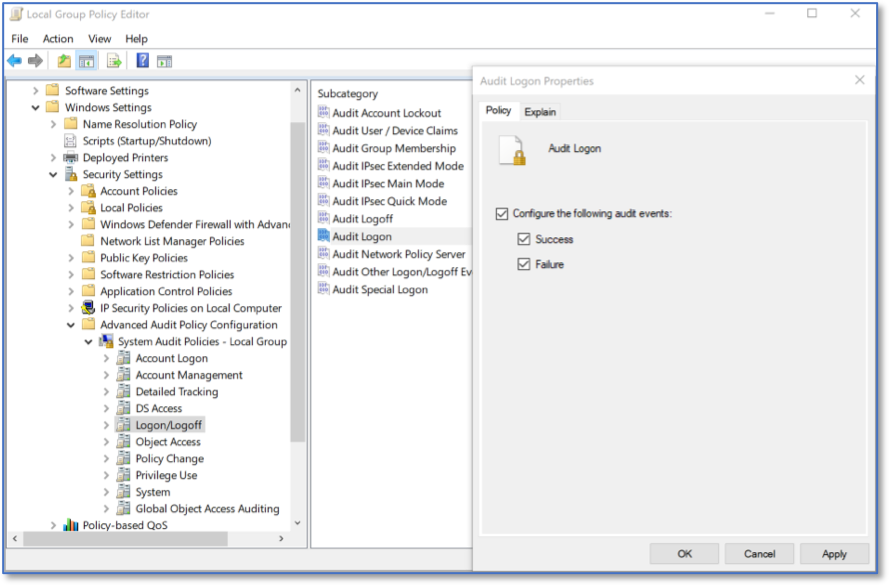
Audit Logon
Under Logon/Logoff, select Audit Special Logon. Ensure that Configure the following audit events is checked, and that Success is checked.
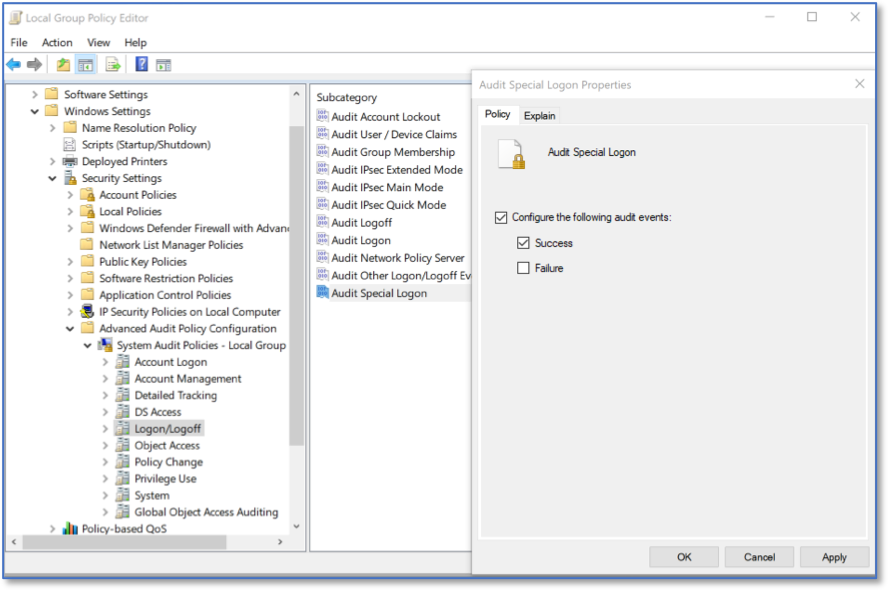
Audit Special Logon
Under Policy Change, select Audit Audit Policy Change. Ensure that Configure the following audit events is checked, and that Success is checked. Also ensure that Failure is checked.

Audit Audit Policy Change
Under Policy Change, select Audit Authentication Policy Change. Ensure that Configure the following audit events is checked, and that Success is checked.
Audit Authentication Policy Change
Under System, select Audit IPsec Driver. Ensure that Configure the following audit events is checked, and that Success is checked. Also ensure that Failure is checked.

Audit IPsec Driver
Under System, select Audit Security State Change. Ensure that Configure the following audit events is checked, and that Success is checked. Also ensure that Failure is checked.
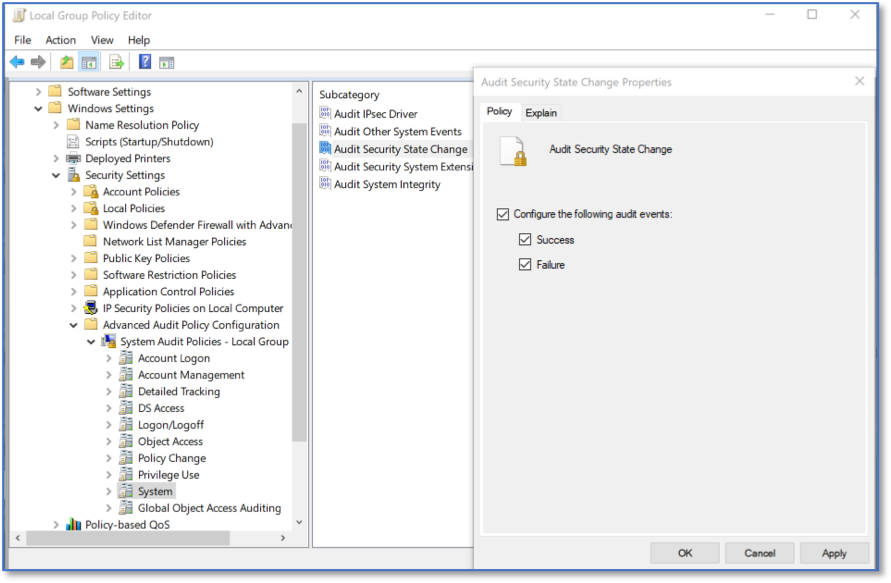
Audit Security State Change
Under System, select Audit Security System Extension. Ensure that Configure the following audit events is checked, and that Success is checked. Also ensure that Failure is checked.

Audit Security System Extension
Under System, select Audit System Integrity. Ensure that Configure the following audit events is checked, and that Success is checked. Also ensure that Failure is checked.

Audit System Integrity
Note
Organizations interested in configuring a broader set of audit logs are encouraged to review the CIS Windows 10 Benchmark (https://www.cisecurity.org/benchmark/microsoft_windows_desktop/).